1.安裝python2.7
https://www.python.org/ftp/python/2.7.11/python-2.7.11.msi
2.安裝pyserial-2.7.win32.exe(2.4...2.7)
http://opensource.ntpc.edu.tw/moodle/pluginfile.php/46228/mod_folder/content/0/pyserial-2.7.win32.exe?forcedownload=1
3.下載PyMata
https://github.com/MrYsLab/PyMata/archive/master.zip
4.解壓縮到c:\
5.開啟命令列程式cmd.exe把下列指令貼上
cd \PyMata-master
c:\Python27\python.exe setup.py install
5.下載s2a
http://opensource.ntpc.edu.tw/moodle/pluginfile.php/46228/mod_folder/content/0/s2a_fm-master.zip?forcedownload=1
6.解壓縮到c:\
7.把s2a_fm_base_zh_tw.sb2放在文件夾中
http://opensource.ntpc.edu.tw/moodle/pluginfile.php/46228/mod_folder/content/0/s2a_fm_base_zh_tw.sb2?forcedownload=1
8.下載Transformer_Setup-1.60-917.zip,解壓縮並安裝
http://opensource.ntpc.edu.tw/moodle/pluginfile.php/46228/mod_folder/content/0/Transformer_Setup-1.60-917.zip?forcedownload=1
9.使用scratch2來開s2a_fm_base_zh_tw.sb2
2016年3月12日

2015年10月26日


2015年9月5日
ubuntu1504安裝scratch2 offline
ubuntu 15.04安裝scratch2 offline 和s2a
記錄一下
sudo -s
cd
##安裝adob air
###安裝Scratch2 offline
wget https://scratch.mit.edu/scratchr2/static/sa/Scratch-439.3.air
Adobe\ AIR\ Application\ Installer ~/Scratch-439.3.air
rm ~/Scratch-439.3.air
##安裝範例檔
wget https://scratch.mit.edu/scratchr2/static/sa/Scratch2StarterProjects.zip
unzip -d /opt/Scratch\ 2/share/Scratch\ Projects Scratch2StarterProjects.zip
rm -rf ~/文件/Scratch\ Projects/
ln -s /opt/Scratch\ 2/share/Scratch\ Projects ~/文件/Scratch\ Projects
###改語系為只有英文和中文
cat /opt/Scratch\ 2/share/locale/lang_list.txt |grep zh-tw >/opt/Scratch\ 2/share/locale/lang_list.txt-cc
mv /opt/Scratch\ 2/share/locale/lang_list.txt-cc /opt/Scratch\ 2/share/locale/lang_list.txt
##安裝s2a
記錄一下
sudo -s
cd
##安裝adob air
###安裝Scratch2 offline
wget https://scratch.mit.edu/scratchr2/static/sa/Scratch-439.3.air
Adobe\ AIR\ Application\ Installer ~/Scratch-439.3.air
rm ~/Scratch-439.3.air
##安裝範例檔
wget https://scratch.mit.edu/scratchr2/static/sa/Scratch2StarterProjects.zip
unzip -d /opt/Scratch\ 2/share/Scratch\ Projects Scratch2StarterProjects.zip
rm -rf ~/文件/Scratch\ Projects/
ln -s /opt/Scratch\ 2/share/Scratch\ Projects ~/文件/Scratch\ Projects
###改語系為只有英文和中文
cat /opt/Scratch\ 2/share/locale/lang_list.txt |grep zh-tw >/opt/Scratch\ 2/share/locale/lang_list.txt-cc
mv /opt/Scratch\ 2/share/locale/lang_list.txt-cc /opt/Scratch\ 2/share/locale/lang_list.txt
##安裝s2a
##安裝python-pip
apt-get install python-pip
##顯示 pre-installed Python 套件: pip freeze##如果沒有出現任何像pyserial==2.5 or pyserial==2.7 在清單中請建立使用 pip, 並安裝 PySerial:
pip install PySerial
##安裝 PyMata 為了串行通訊在Python 用 Firmata 在 Arduino (PySerial 需要事先安裝 ):
pip install PyMata
##下載s2a到家目錄
wget https://github.com/MrYsLab/s2a_fm/archive/master.zip
unzip master.zip
cp -a s2a_fm-master /usr/share/
chmod -R 777 s2a_fm-master/
下載連線程式
cd /home/teacher
wget ftp://163.20.108.1/open/s2a_content.sh
wget ftp://163.20.108.1/open/s2a_content.png
chmod +x s2a_content.sh
cp -a s2a_content.sh /usr/share/s2a_fm-master
mv s2a_content.sh ~/s2a_fm-master
cp s2a_content.png /usr/share/s2a_fm-master
cp ~/s2a_fm-master/ScratchFiles/ScratchProjects/s2a_fm_base_zh_tw.sb2 ~/s2a_fm-master/
cp /usr/share/s2a_fm-master/ScratchFiles/ScratchProjects/s2a_fm_base_zh_tw.sb2 /usr/share/s2a_fm-master
cd ~/Desktop
wget ftp://163.20.108.1/open/s2a_Scratch%202.desktop
chmod 777 s2a_Scratch\ 2.desktop
wget ftp://163.20.108.1/open/s2a.desktop
chmod 777 s2a.desktop
改ttyUSB0的群組
vim /etc/group
找到 dialout
在:後加入使用者,我這裡習慣用teacher和student就會成為下列
dialout:x:20:teacher,student
2014年10月12日
ntpc U&M安裝s2a
記錄一下在新北市教育作業系統安裝s2a實(scratch2先升級到最新版)
參考文章:http://www.computacaonaescola.ufsc.br/?page_id=503&lang=en
1.安裝python-pip
參考文章:http://www.computacaonaescola.ufsc.br/?page_id=503&lang=en
1.安裝python-pip
sudo -s
apt-get update
apt-get install python-pip
2.顯示 pre-installed Python 套件:
pip freeze
3.如果沒有出現任何像pyserial==2.5 or pyserial==2.7 在清單中請建立使用 pip, 並安裝 PySerial:
pip install PySerial
4.安裝 PyMata 為了串行通訊在Python 用 Firmata 在 Arduino (PySerial 需要事先安裝 ):
pip install PyMata
5.下載s2a到家目錄
https://github.com/MrYsLab/s2a_fm
6.解壓縮,並複製s2a_fm_base_zh_tw.sb2到文件資料夾中
unzip s2a_fm-master.zip
chmod -R 777 s2a_fm-master
cp s2a_fm-master/ScratchFiles/ScratchProjects/s2a_fm_base_zh_tw.sb2 ~/Documents/
chmod 777 ~/Documents/s2a_fm_base_zh_tw.sb2
7.開啟終端機
sudo -s
cd ~/cd s2a_fm-master
python s2a_fm.py /dev/ttyACM0
為了避免學生輸入一堆英文字,可以把這一段做成一個sh內容如下
#!/bin/bash
cd ~/
cd s2a_fm-master
python s2a_fm.py /dev/ttyUSB0
並做成一個.desktop來執行
8.看到
s2a_fm version 1.5   Copyright(C) 2013-14 Alan Yorinks    All Rights Reserved
PyMata version 1.58  Copyright(C) 2013-14 Alan Yorinks    All rights reserved.

Opening Arduino Serial port /dev/ttyACM0
Please wait while Arduino is being detected. This can take up to 30 seconds ...
Board initialized in 0 seconds
Total Number of Pins Detected = 20
Total Number of Analog Pins Detected = 6
Please wait for Total Arduino Pin Discovery to complete. This can take up to 30 additional seconds.
Arduino Total Pin Discovery completed in 0 seconds
Starting HTTP Server!
Use <Ctrl-C> to exit the extension

Please start Scratch or Snap!
表示連線成功
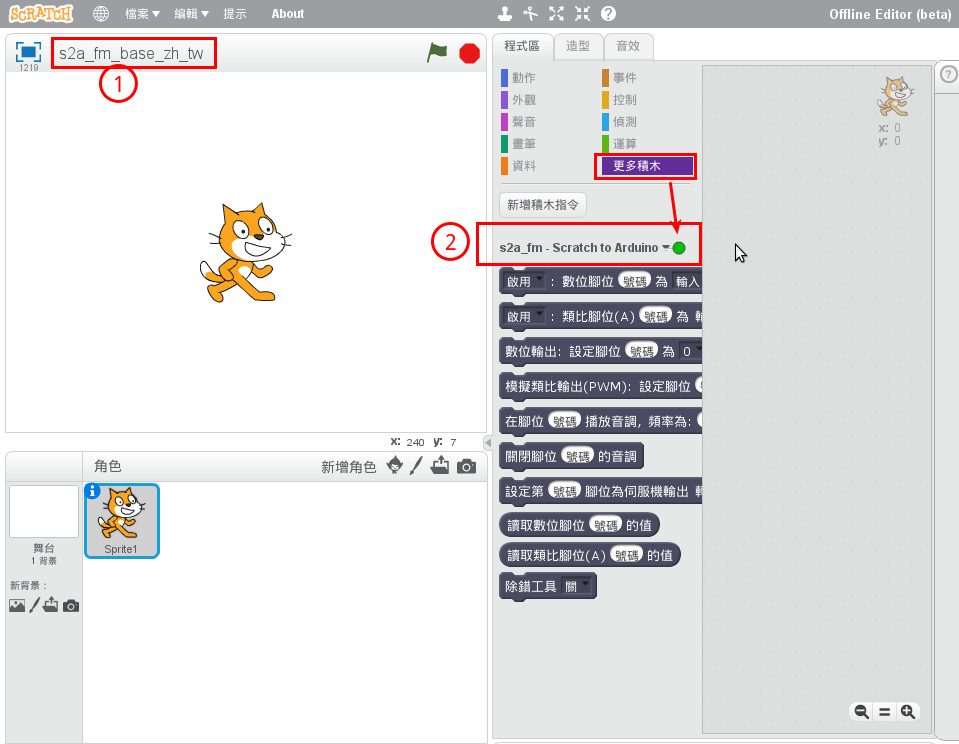
9.啟動scratch2,並開啟文件資料夾中的s2a_fm_base_zh_tw.sb2
看到 下圖表示連線成功可以運作了。

訂閱:
文章 (Atom)